Why I Migrated bimalrp.com From WordPress to Astro
In short
Bimal moved bimalrp.com from WordPress on local Nepali hosting to Astro, GitHub and Cloudflare Pages because a simple blog and service site did not need a database, PHP, a theme and plugins. Astro builds static HTML, so the site is faster, cheaper and easier to secure, and hosting is free apart from the domain. WordPress is still the right choice for stores, memberships and multi-editor sites.
For years, bimalrp.com ran on WordPress with a local Nepali hosting provider. On January 1, 2026, I made a resolution to actually take this site seriously — and the first real test of that resolution wasn’t content. It was the platform underneath it.
This is why I moved off WordPress entirely and rebuilt the site on Astro.
The Hosting Problem Nobody Warns You About
I started with a local Nepali hosting provider — reasonable logic at the time, I wanted local support, local billing, local everything. In practice, it was a constant source of friction. Support was slow or non-existent when something broke. Small issues turned into hours lost. For a site I wanted to run as a serious professional asset, I was spending more time fighting my host than writing anything worth reading.
That alone would have been reason enough to look elsewhere. But the deeper problem wasn’t the host — it was WordPress itself, running on top of it.
This Isn’t an Anti-WordPress Post
I need to say this clearly, because it would be strange coming from me otherwise: I love WordPress. I founded WP Tracer in 2021, and to this day a meaningful part of what I do — sites, plugins, tools, client work — is built on WordPress. If WordPress were actually a bad platform, I wouldn’t have built a portfolio around it.
WordPress isn’t the problem. It’s an exceptional platform when the job actually calls for it — a real CMS, a proper database, multiple editors working together, dynamic functionality, a store, a membership system. For those use cases, WordPress is still my first recommendation, and will be for a long time.
The mismatch was never “WordPress is bad.” It was “WordPress is the wrong tool for a personal blog with a handful of static pages.” Running a full CMS and database to serve five service pages and the occasional blog post is like hiring a full accounting team to track your own pocket money — the tool works fine, it’s just built for a job I don’t have.
What WordPress Was Actually Costing Me
WordPress is a genuinely good platform for a lot of use cases. Mine wasn’t one of them. A blog and a handful of service pages don’t need a database, a PHP runtime, a theme, and a stack of plugins just to stay online. What I actually had was:
- Constant maintenance — core updates, theme updates, plugin updates, and the anxiety of one of them breaking something else
- A widening security surface — every plugin I added was one more thing that could get compromised
- No real mental peace — a “simple blog” that required ongoing admin work just to keep functioning, not to keep improving
I came across Joost de Valk — the founder of Yoast SEO, someone who has spent two decades deep inside the WordPress ecosystem — making the case that most sites don’t actually need a CMS at all. They need a website. Coming from someone who built one of the most-used SEO tools for WordPress, and who still runs WordPress for the projects that genuinely need it, that argument landed differently than it would from a random blog post.
Why Astro, Specifically
Astro rebuilds the site as static HTML at build time — no database, no PHP, no server managing requests in real time. I pushed the site to GitHub, connected the repo to Cloudflare Pages, and now every commit to main triggers a fresh build and deploy automatically. No hosting bill. No server to patch. No plugin to accidentally break the checkout… except I don’t have a checkout, I have a blog, which was exactly the point.
Three things sealed it for me:
-
It’s free. Cloudflare Pages hosts static sites at no cost. The only ongoing expense is the domain itself, which I’d be paying regardless of platform.
-
No hosting to manage. There’s no server for me to secure, patch, or troubleshoot at 11pm when something goes down. The build either succeeds or it doesn’t, and Cloudflare tells me immediately either way.
-
More control, not less. This was the part I didn’t expect going in. I assumed leaving WordPress meant giving up flexibility. It’s the opposite. Every meta tag, every schema block, every bit of markup on this site is something I wrote and understand — not something a theme or plugin injected on my behalf. When SEO or design needs to change, I change the actual code, not a settings panel three menus deep hoping it does what the label says.
The Real-World Difference — Google PageSpeed Insights
Numbers make this concrete faster than any explanation. Here’s the same site, before and after:
| Metric | Before (WordPress) | Now — Mobile | Now — Desktop |
|---|---|---|---|
| Performance | 61 | 91 | 97 |
| Accessibility | 87 | 100 | 100 |
| Best Practices | 100 | 92 | 92 |
| SEO | 100 | 100 | 100 |
| Agentic Browsing | 1/3 | 3/3 | 3/3 |
Both readings below come from the same run on 2 September 2026. Mobile first, because that is how the overwhelming majority of Nepali visitors actually arrive.
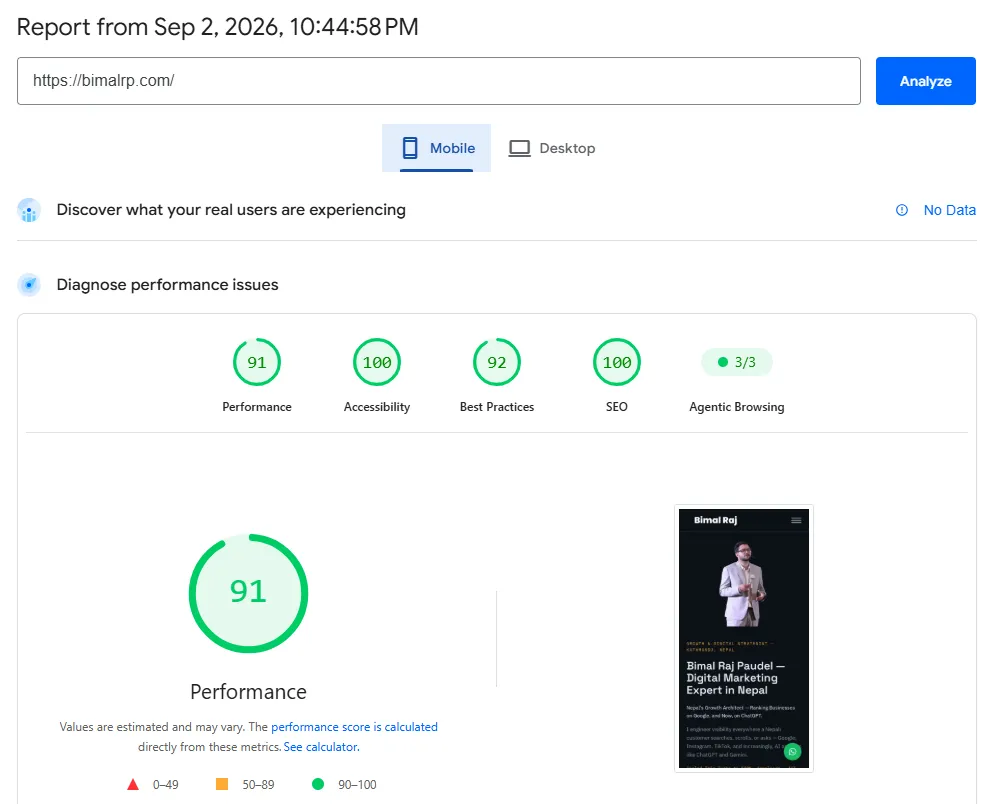
PageSpeed Insights (Mobile) for bimalrp.com, 2 September 2026.
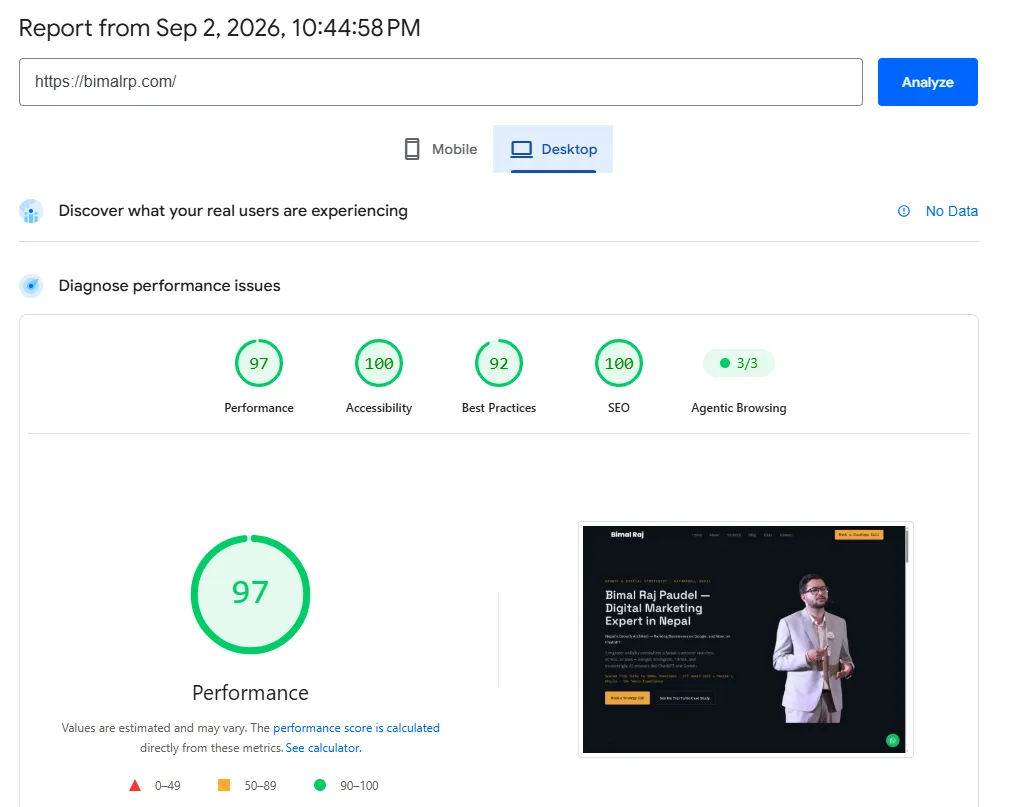
PageSpeed Insights (Desktop) for bimalrp.com, 2 September 2026.
SEO was already maxed out under WordPress and stayed there. The real story was Performance at 61 and an Agentic Browsing score of 1 out of 3: a heavier platform than a simple blog needed, and a site that was not especially easy for AI systems and crawlers to read cleanly. Those are exactly the two areas a static site fixes by default, since there is no theme bloat, no render-blocking plugin scripts, and no server round-trip standing between a request and the actual HTML.
Performance is where the change is most obvious — 61 to 91 on mobile, and 97 on desktop. Accessibility moved from 87 to a clean 100, and the Agentic Browsing score went from 1 out of 3 to 3 out of 3, which matters more every month as AI systems become a real source of discovery.
One number moved the wrong way, and it is worth saying so plainly: Best Practices dropped from 100 to 92. I ran Lighthouse against the live site to find out why, and the answer turned out to be worth a section of its own.
The 92 is the security header doing its job
Exactly two audits are failing, and both are the same underlying thing: three requests are being blocked by the site’s Content Security Policy.
| Blocked request | What it is |
|---|---|
stats.g.doubleclick.net/g/collect |
GA4 sending data to Google Signals for remarketing |
c.bing.com/c.gif |
Microsoft Clarity syncing to Bing’s ad platform |
www.google.com.np/ads/ga-audiences |
Google Ads remarketing audience pixel |
The site ships a stricter Content Security Policy than most WordPress installs do, and it does not allowlist advertising endpoints. So the browser refuses those three requests, logs a message for each, and Lighthouse counts those messages against the score. Core analytics still work; what is blocked is the remarketing layer.
The obvious fix is to allowlist the three hosts so the requests succeed and the errors disappear. I am not going to, because it would almost certainly make the score worse rather than better. Lighthouse weights its “uses third-party cookies” audit at five points against one point each for the console audits — and that cookie audit is currently passing precisely because those ad endpoints are blocked. Opening the policy to recover seven points risks losing eighteen.
So the 92 is not damage from the migration. It is a deliberate tradeoff, and the console errors are the sound of the policy working. If you would rather not see them at all, the clean fix is switching off Google Signals in GA4 so the calls are never attempted — not loosening the header so they go through.
A migration that improved four scores and cost one would still have been worth making. But the fifth number turned out not to be a cost at all, and I would not have known that without actually opening the report instead of guessing at it.
What I’d Tell Any Nepal Business Considering the Same Move
This isn’t a blanket “WordPress is bad” post — WordPress genuinely earns its complexity when you have a team of editors, a membership site, an online store, or content that needs to be different for every visitor. If that’s your business, stay on WordPress, and stay on a host that actually supports you.
But if your site is a handful of pages and a blog — which describes a large share of the Nepal businesses and personal brands I work with — the honest question isn’t “which WordPress host is more reliable.” It’s whether you need WordPress at all.
Frequently Asked Questions
Is Astro free to use?
Yes. Astro itself is open-source and free. The only real cost in this setup is the domain name — hosting on Cloudflare Pages and version control on GitHub are both free for a site of this size.
Do I need to know how to code to use Astro?
Some comfort with code helps, since content lives as Markdown files in a GitHub repository rather than a visual editor. For a business owner who wants zero touch-points with code, a traditional CMS or a builder like Squarespace or Wix is still the simpler day-to-day choice. For anyone willing to learn the basics — or who has someone who can manage it for them — the trade-off is well worth it.
Will moving to Astro hurt my SEO?
No — if anything, it’s an advantage. Everything a WordPress SEO plugin does — sitemaps, meta tags, canonical URLs, structured data — is just HTML output in the end. A static site lets you control that output directly, with no theme or plugin fighting over what actually ends up in the page head.
Can I still have a blog and update content regularly on Astro?
Yes. This entire post was written and published the same way every other post on this site is — as a Markdown file, committed to GitHub, deployed automatically by Cloudflare Pages. The publishing workflow is different from a WordPress admin panel, not harder.
Is Astro a good fit for every website?
No. Sites that need real-time collaboration between multiple editors, membership or login systems, e-commerce, or content that changes per visitor genuinely need a CMS or an application framework. A static site generator like Astro is built for content — pages and posts — not for running an application.
What made you finally decide to migrate instead of just fixing the WordPress setup?
The hosting issues were fixable in isolation, but they were a symptom, not the actual problem. Even with better hosting, I’d still be maintaining a database, a theme, and a stack of plugins to run what is fundamentally a simple site. Moving to Astro removed the underlying problem instead of patching around it.
Doesn’t running WP Tracer make this a strange move?
Not really — WP Tracer exists because WordPress genuinely is the right platform for a huge share of the sites and clients I work with. This migration wasn’t about WordPress being wrong. It was about matching the right tool to a specific, simple use case. I’d make the same recommendation to any client: use WordPress when you need a real CMS, use something lighter when you don’t.
If you’re a Nepal business or founder wondering whether your site actually needs the CMS it’s running on, this is the exact conversation I’d have with you.
Talk to Bimal About Your Website →
Related reading: