Programmatic SEO: What It Is, How to Do It, and the Risks and Benefits
In short
Programmatic SEO means building many pages from one template and a real dataset, each targeting a specific search such as a bus route or a product price. Done well, it captures long-tail searches a homepage never would, as MakeMyTrip shows at scale. The risks are thin, doorway-like pages, crawl budget limits and stale data, so every page needs genuinely useful content and ongoing upkeep.
Some websites have thousands, even millions, of pages. Nobody wrote each one by hand. They used a system called programmatic SEO.
This post covers everything you actually need to know. What it is. How it’s different from regular SEO. How to do it, step by step, with real tools and real examples. And the real risks and benefits, so you know exactly what you’re getting into.
Table of Contents
- What Is Programmatic SEO?
- Programmatic SEO vs. Regular SEO
- How to Do It
- Step 1: Find Keywords That Scale
- Step 2: Check What People Actually Want
- Step 3: Find Your Data
- Step 4: Build One Solid Template
- Step 5: Connect Your Data Using the Right Tools
- Step 6: Structure Your Pages So Google Can Actually Find Them
- Step 7: Watch Your Crawl Budget
- Step 8: Monitor and Track After Launch
- Real Examples of This in Action
- The Risks
- The Benefits
- When It’s Not Worth Doing
- A Complete Checklist to Do This Right
- Frequently Asked Questions
- Is programmatic SEO the same as keyword stuffing?
- Is programmatic SEO only for big companies?
- How do I know if a programmatic page is “thin content”?
- What tools do I actually need to get started?
- What is crawl budget, and why does it matter here?
- Did MakeMyTrip actually get penalized for their microsite strategy?
- What’s the biggest mistake businesses make with programmatic SEO?
- When should a business avoid programmatic SEO entirely?
What Is Programmatic SEO?
Programmatic SEO means building many web pages using one template and a big set of data.
Think of it like a form letter. You write the letter once. Then you fill in a different name each time. Programmatic SEO does the same thing, but for web pages.
One template. Many versions. Each version targets a slightly different search.
A simple example: imagine a page called “Flights from Kathmandu to Pokhara.” Now imagine that same page, but for every city pair a travel company flies to. Kathmandu to Pokhara. Kathmandu to Biratnagar. Pokhara to Bhairahawa. You don’t write each page by hand. You build one template, plug in real data, and the system creates hundreds of pages automatically.
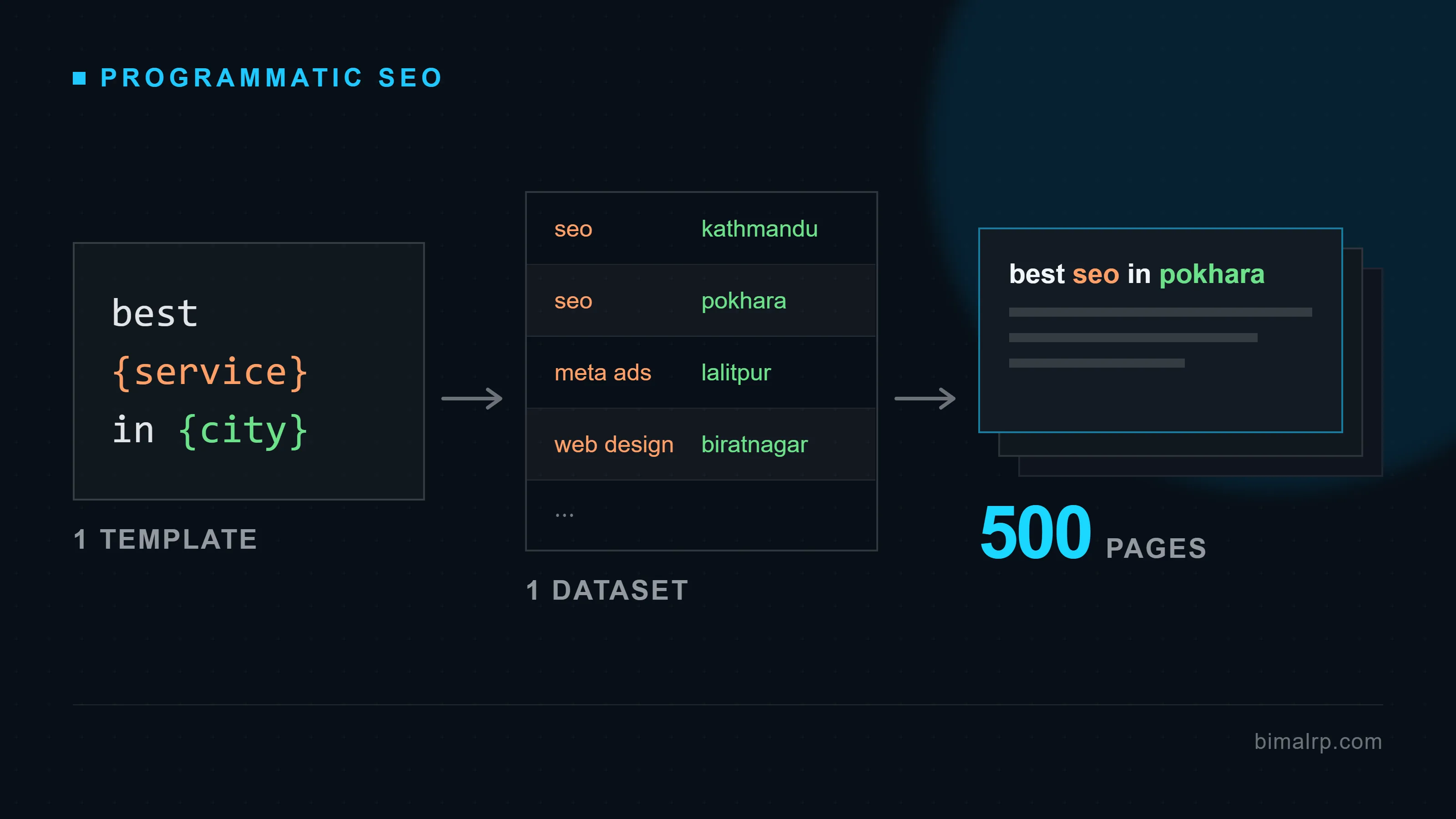
The same idea as a diagram: one keyword pattern, one data table, hundreds of pages — as long as each one actually answers a real query.
Programmatic SEO vs. Regular SEO
These two approaches solve different problems. Mangools breaks down the difference clearly, and it comes down to a few key points:
| Regular SEO | Programmatic SEO | |
|---|---|---|
| Best for | Unique, in-depth pages that need a real, distinct voice | Many similar pages — products, locations, routes |
| Keywords | Broad, competitive, high-volume terms | Specific, low-competition, long-tail terms |
| Content creation | Slow, manual, one page at a time | Fast, automated, many pages at once |
| Skills needed | Strong writing and SEO knowledge | SEO knowledge plus some technical or data skills |
Neither approach replaces the other. Most large websites use both — regular SEO for their most important pages, programmatic SEO for everything that repeats at scale.
How to Do It
Step 1: Find Keywords That Scale
Start with one broad “head” keyword related to your business. Then look for the long-tail variations — the more specific versions people actually type into Google.
If the pattern you find is location-based — “[service] in [city]” — you’re standing at the overlap between this and local SEO. The two disciplines solve it differently: local SEO wins one city through a Google Business Profile, while programmatic SEO wins every city at once through pages. A business chasing both should keep them working together, not treat them as competing strategies.
For example, instead of just “hotels,” look for patterns like “hotels in [city]” or “hotels near [landmark].” Ahrefs recommends using a keyword research tool to find these variations at scale, then filtering for ones with real search volume and low competition.
The goal is finding a pattern that repeats hundreds or even thousands of times, with just one part of the phrase changing each time.
Step 2: Check What People Actually Want
Before building anything, look at what’s already ranking for a few of your target keywords. What information do those pages actually show?
For “cost of living in [city]” searches, for example, top-ranking pages usually show a cost score, comparisons with other cities, and a breakdown of specific costs like rent and food. That tells you exactly what your own template needs to include to genuinely satisfy the search, not just guess at it.
Step 3: Find Your Data
Every programmatic page needs real data behind it. There are a few real sources to pull from:
- Your own data — product catalogs, prices, routes, anything you already have. This is the strongest option, since nobody else has it.
- Public data — information published by governments, industry bodies, or open datasets, licensed for you to use.
- Scraped data — information pulled from other websites using a tool. This needs real care, since it can raise legal and copyright issues if not done properly.
- User-generated content — reviews, ratings, and comments your own users have created.
Whatever the source, the data needs to be accurate and kept current. Stale data is one of the fastest ways this strategy backfires.
Step 4: Build One Solid Template
Design a single page layout that works no matter what data gets plugged into it. This template needs real thought behind it — good structure, clear information, a logical flow — since every single page built from it inherits the same quality, good or bad. The same on-page fundamentals that apply to any page — title tags, header structure, schema — still apply here, just baked into the template once instead of checked page by page.
Step 5: Connect Your Data Using the Right Tools
You don’t need to be a developer to get started. Common no-code options include:
- Google Sheets or Airtable as a simple database to hold your data
- Whalesync or similar tools to connect that database to your website automatically
- WP All Import, if your site runs on WordPress, to turn a spreadsheet into live pages
For real scale — thousands of pages, updated automatically — you’ll eventually need a developer to connect a proper database directly to your site. But these no-code tools are a genuine way to test the idea first, as Semrush’s guide walks through in detail.
Step 6: Structure Your Pages So Google Can Actually Find Them
Once you have many similar pages, how they connect to each other matters as much as the pages themselves.
- Link related pages to each other. A route page for “Kathmandu to Pokhara” should link to nearby related routes, not sit on its own with no connections.
- Avoid orphan pages — pages nothing else on your site links to. If Google can’t find a path to a page through your site’s own links, it’s much less likely to get indexed properly.
- Build a clear hierarchy. Group related pages together — all your route pages in one section, all your category pages in another — so both Google and visitors understand how everything fits together.
Step 7: Watch Your Crawl Budget
This is a real, specific risk worth understanding: Google only checks a limited number of your pages within a given period of time. This is called your crawl budget.
If you publish thousands of new pages all at once, you can overwhelm this budget — and some pages may not get crawled or indexed properly for a while, or your server can slow down trying to serve too many requests to Google’s crawler at once. Publishing in reasonable batches, and using Google Search Console’s Crawl Stats report to monitor what’s actually happening, helps avoid this. Google’s own guidance on managing crawl budget for large sites covers this in more technical depth if you’re publishing at real scale.
Step 8: Monitor and Track After Launch
Once your pages are live, don’t walk away from them. Keep checking:
- Google Search Console — to see which pages are actually indexed, and which search terms are driving real traffic
- A rank tracking tool — to watch how your target keywords are performing over time
- A site audit tool — to catch broken links, duplicate content, and pages that have quietly gone stale
Real Examples of This in Action
MakeMyTrip (India) runs one of the biggest programmatic SEO operations in the world — reportedly over 17 million pages indexed on Google. Their system builds pages for flight routes (“Delhi to Mumbai Flights”) and for hotels near specific landmarks in specific cities, all from the same core template filled with real, live data.
TripAdvisor takes this even further. Mangools documents figures as high as 71 million indexed pages for TripAdvisor’s destination, “Things to Do,” and restaurant pages, ranking for millions of keywords. That scale simply isn’t possible without a template-and-data system doing the heavy lifting.
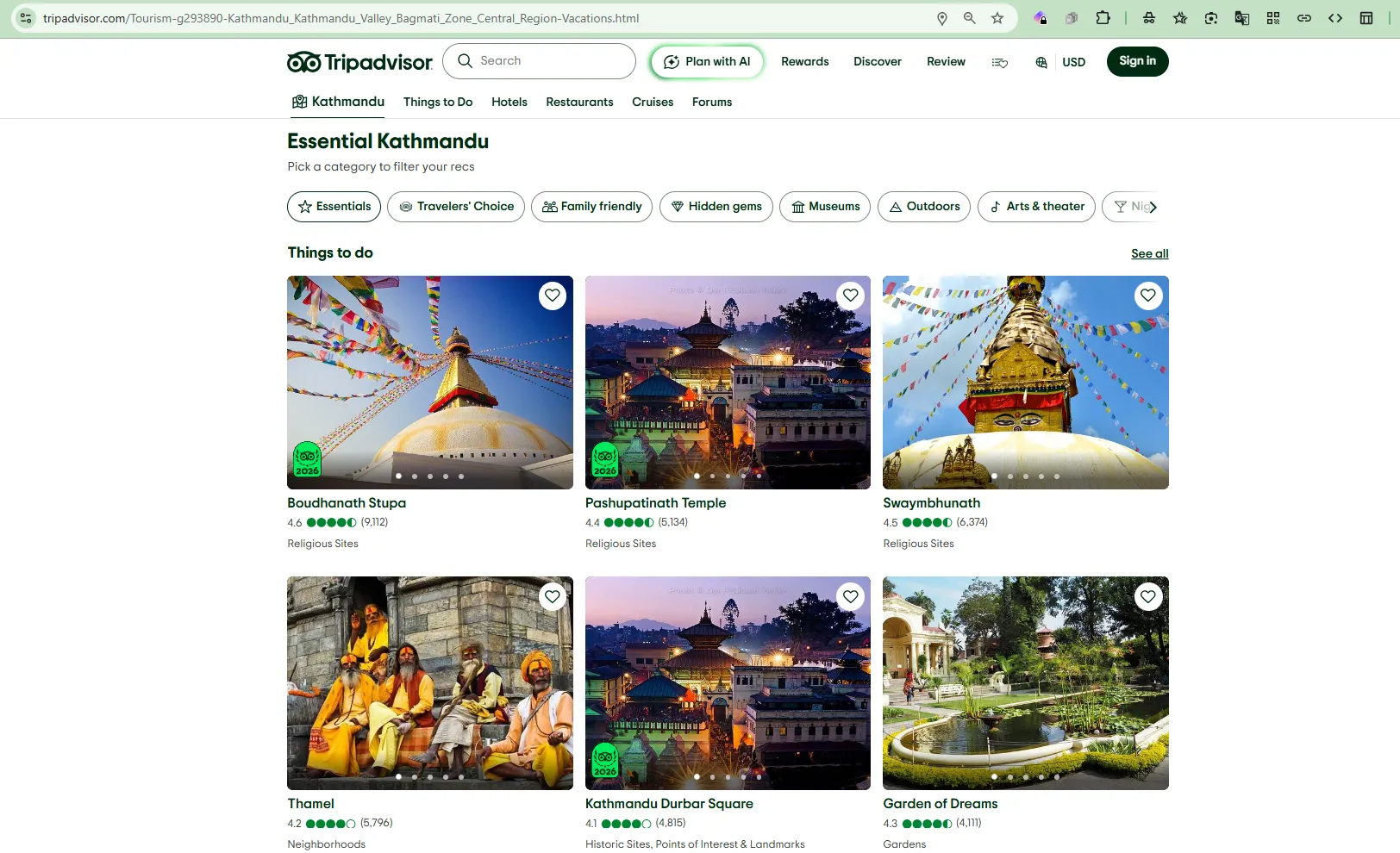
TripAdvisor’s destination template, rendered for Kathmandu — the same layout runs for every city they cover.
Zapier, the workflow automation tool, built its entire “Connect [App] + [App]” integration page system the same way — hundreds of thousands of pages, each targeting one specific software pairing, according to Ahrefs’ breakdown of the strategy.
GoMyGo (Nepal), a Nepal bus ticket platform, runs a smaller but very real version of the same idea. They publish dedicated pages for specific routes: Kathmandu to Biratnagar, Kathmandu to Janakpur, Kathmandu to Bhojpur, and more — each one targeting exactly how a real traveler searches, instead of one generic page trying to rank for everything.
Buddha Air (Nepal), one of Nepal’s major domestic airlines, keeps a dedicated flight routes page listing every destination they fly to, paired with blog content built around specific destinations — same underlying idea, matching real search intent with a real dedicated page.
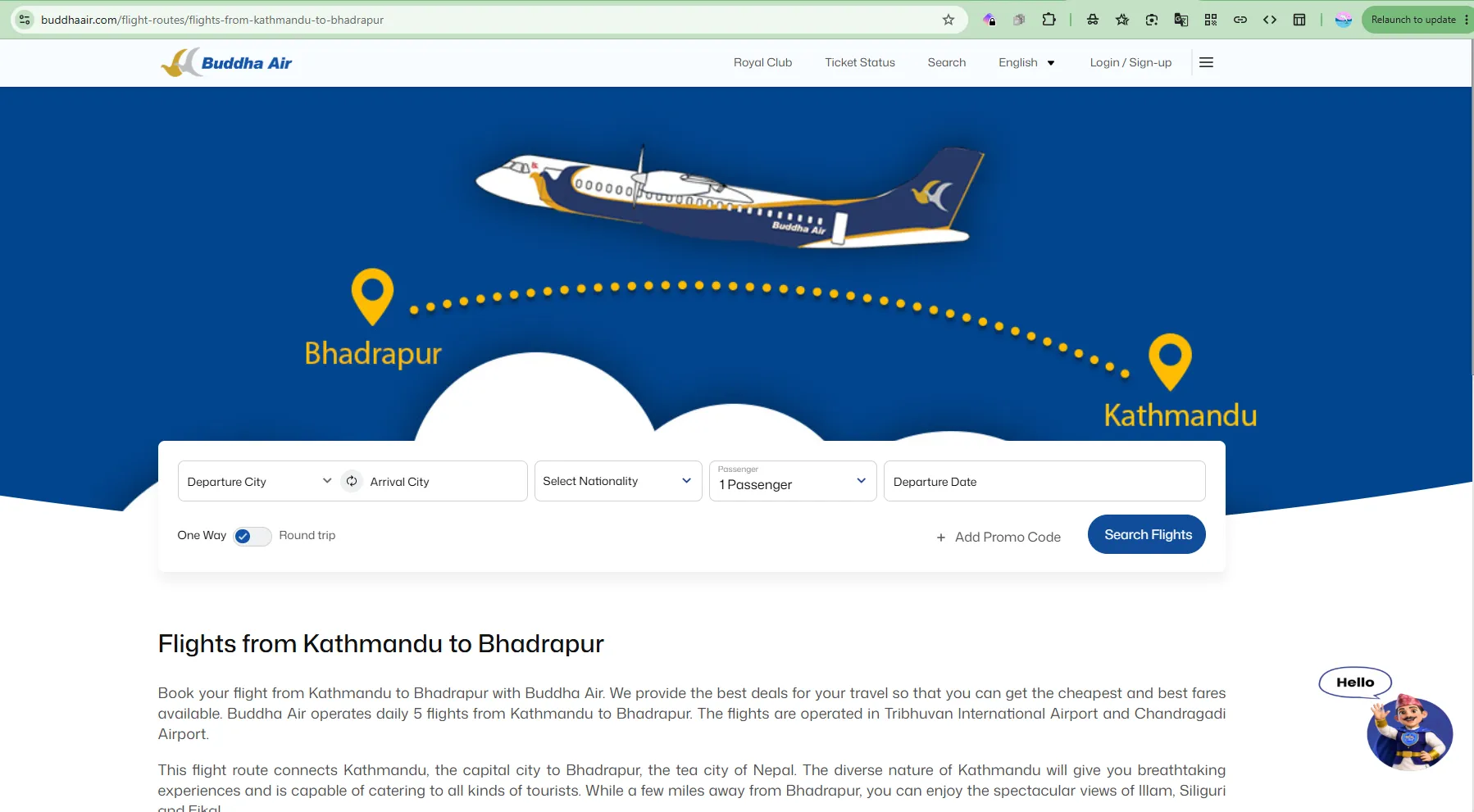
One page from Buddha Air’s route template — the same layout, regenerated for every city pair they fly.
eCommerce brands use the same trick with products instead of routes. A page like “Laptop Price in Nepal,” showing multiple brands and models with current prices, is a programmatic-style category page — one repeatable template, filled with real product data. It’s the same category-page thinking covered in the eCommerce marketing playbook, just applied at template scale instead of one category at a time.
If you’re running a large travel OTA for hotels and flights — the kind of scale I worked at growing Trip Turbo to 500K+ downloads — the same steps apply at bigger scale: build route pages for every real city pair you serve, not just your busiest ones. Pull pricing directly from your live booking system. Add real content — travel time, best time to book — under every page. And build the same approach for hotels, using city plus neighborhood, or city plus landmark, as your pattern.
The Risks
Thin content is the biggest danger. If a page is just a template with numbers swapped in, and nothing else, it often reads as low-value. Google calls the worst version of this a “doorway page” — a page built purely to rank, with no real value to the person reading it — and it’s explicitly against Google’s spam policies.
Stale data kills trust fast. A price page showing numbers from six months ago looks broken the moment a real visitor notices — and on a price-focused page, they will notice.
Publishing too fast can overwhelm your crawl budget. As covered in Step 7 above, dumping thousands of pages online at once can slow down how efficiently Google finds and indexes them — and can strain your own server too.
It can look like spam if done wrong, even at a big company. MakeMyTrip is actually a good example of both sides of this. Their template-based route and hotel pages are a genuine success story. But the same company also ran a separate, more aggressive strategy — dozens of near-identical microsites with keyword-stuffed domains, all secretly linking back to the same main site. That second strategy got flagged publicly as a manipulative link scheme.
Even Google’s own team warns about this directly. Google’s John Mueller has said plainly that programmatic SEO often ends up being little more than a nicer name for spam, and Google’s own guidance stresses that new pages need to bring real, unique value — not just add to the page count. Mangools has the fuller context on this, including Google’s own quote on what actually separates real success from a pile of thin pages.
Quality control gets harder at scale. With ten pages, you can check each one by hand. With ten thousand, mistakes multiply everywhere at once without a real system in place.
The Benefits
It captures searches you’d otherwise miss. People search for very specific things. “Kathmandu to Janakpur bus ticket” is a real search. A generic homepage won’t rank for it. A dedicated page can.
It scales fast, with real numbers to prove it. Semrush’s own breakdown points to Yelp as a clean example — city and category pages built entirely from business listing data, covering over 150 cities without anyone writing each page by hand.
It matches what people actually search for. Someone searching “laptop price in Nepal” wants a specific answer, not a generic blog post. Programmatic pages can give them exactly that.
It’s efficient long-term. One well-built template can keep producing value for years, as long as the data behind it stays accurate.
When It’s Not Worth Doing
Programmatic SEO isn’t the right fit for every business, and it’s worth knowing when to skip it.
If your business doesn’t have enough real variation to fill a template, this won’t work. A small local bakery with five product types simply doesn’t have the volume of genuinely different pages needed to make this worthwhile — you’d end up forcing pages that shouldn’t exist.
If you can’t commit to maintaining it, don’t start. A pile of abandoned, outdated pages does more damage to your site’s trust than not having them at all.
If the keyword opportunity is genuinely small, the effort may not pay off. This strategy earns its cost at real scale — dozens or hundreds of genuinely useful pages, not five.
A Complete Checklist to Do This Right
- Real, current data behind every page — never fake or estimated numbers
- Genuine content beyond just the data table, on every page
- Pages linked to related pages, with no orphan pages left unconnected
- Publishing rolled out in reasonable batches, not thousands at once
- A system to catch stale or broken pages before they hurt trust
- Search Console and a rank tracker set up before or right after launch
- Templates built for real search intent, not just to inflate page count
- Regular review of which pages are actually working, and which aren’t
Frequently Asked Questions
Is programmatic SEO the same as keyword stuffing?
No. Keyword stuffing means repeating a keyword unnaturally on one page. Programmatic SEO means building many genuinely useful pages, each targeting a different specific search. Done well, it’s a legitimate strategy. Done poorly, it can look spammy, which is a real risk worth taking seriously.
Is programmatic SEO only for big companies?
No. A small Nepal business can use the same idea on a smaller scale — a handful of well-built category or route pages can genuinely help, even without thousands of pages.
How do I know if a programmatic page is “thin content”?
Ask if the page would still be useful without the data table. If the answer is no, add real content — a guide, real advice, real context — until the answer is yes.
What tools do I actually need to get started?
For a basic version, a spreadsheet like Google Sheets or Airtable, plus a connector tool like Whalesync, or a plugin like WP All Import if you’re on WordPress. For real scale with automatically updating data, you’ll eventually need a developer to connect a proper database.
What is crawl budget, and why does it matter here?
It’s the limited number of pages Google is willing to check on your site within a given period. Publishing too many pages too fast can overwhelm it, meaning some pages take longer to get indexed, or don’t get indexed properly at all. Rolling out new pages in batches helps avoid this.
Did MakeMyTrip actually get penalized for their microsite strategy?
The strategy was publicly flagged as a likely link scheme by SEO analysts, given the shared ownership and matching footprints across the microsites. It’s a real, documented cautionary example, even without confirming a specific formal Google penalty.
What’s the biggest mistake businesses make with programmatic SEO?
Building the pages and then forgetting about them. Stale data and abandoned pages are what turn a good strategy into a liability.
When should a business avoid programmatic SEO entirely?
When there isn’t enough genuine variation in the business to fill a template with real, different data, or when there isn’t the time and resources to keep the pages accurate long-term. Forcing this strategy where it doesn’t fit usually creates thin content, not real value.
Programmatic SEO can be one of the most powerful tools available for a travel or eCommerce business in Nepal — if it’s built the right way. That’s exactly the kind of strategy work I help businesses figure out.
Talk to Bimal About Your SEO Strategy →
Related reading:
- SEO for Nepal Businesses: The Complete Beginner’s Guide
- eCommerce Marketing Strategy for Nepal: The Complete Playbook
- How Trip Turbo Became Nepal’s #1 Travel App
Sources: Semrush — What Is Programmatic SEO?, Ahrefs — Programmatic SEO, Explained for Beginners, Mangools — What Is Programmatic SEO & How Does It Work?, Google Search Central — Spam Policies, Google Search Central — Managing Crawl Budget, upGrowth — MakeMyTrip Programmatic SEO, PhocusWire — MakeMyTrip’s Microsite Strategy
More in SEO
View all →September 12, 2026
Link Building for Nepal Websites: How to Get Backlinks That Actually Move Rankings
Realistic link building tactics for Nepal websites — what actually counts as a good backlink, how to earn them without buying fake DA packages, and what to avoid entirely.
September 11, 2026
How Long Does SEO Take to Show Results for a Nepal Business?
A month-by-month breakdown of how long SEO actually takes to show results for a Nepal business, what changes the timeline, and how to tell normal patience from an actually broken strategy.
September 10, 2026
What is Domain Authority and Why It Matters for Nepali Websites
What Domain Authority actually is, why Google doesn't use it directly, why it still matters for Nepali websites, and how the DA-for-sale scams targeting Nepal businesses actually work.