On-Page SEO Checklist for Nepal Websites: Everything You Need to Rank in 2026
In short
On-page SEO covers what you control on each page: a clear title tag and meta description, natural keyword placement, one H1 with logical H2s and H3s, schema markup, internal links, fast loading, mobile-friendly design, an XML sitemap and an honest last-updated date. Check indexability first with Search Console's URL Inspection, because if Google cannot read the page, nothing else matters.
I once worked with a company whose website was genuinely well-designed, fast to interact with, and built on Vue.js as a single-page application. It looked great. It also had a real, serious problem: Google couldn’t read it.
The meta description, the keywords, the actual content of the pages — none of it was reliably visible to Google’s crawler, because the site rendered everything client-side in a way search engines struggled to process properly. We tried prerendering as a fix. It helped, but not enough. The team ultimately had to migrate the entire site to Nuxt.js — Vue’s server-rendering framework — to actually solve it properly. I flagged the issue early, though the migration itself was the dev team’s call to execute.
I’m opening with that story because it’s the clearest illustration of a truth this checklist is built around: on-page SEO isn’t just about what you write. It’s about whether Google can actually see what you wrote in the first place. Get that wrong, and every other item on this list becomes irrelevant.
Table of Contents
- What On-Page SEO Actually Covers
- Title Tags and Meta Descriptions
- Keyword Placement, Done Naturally
- Header Structure (H1, H2, H3)
- Schema Markup
- Website Structure and Internal Linking
- Site Speed and Core Web Vitals
- XML Sitemaps
- Indexability: The Problem Most Checklists Skip
- Mobile Optimization
- llms.txt for GEO
- Last Updated Dates and Content Freshness
- The Full On-Page SEO Checklist
- Frequently Asked Questions
- What’s the difference between on-page SEO and technical SEO?
- Can a website with great content still fail to rank?
- How do I check if my website is actually being indexed properly?
- Do single-page applications always have SEO problems?
- Is schema markup required for on-page SEO, or optional?
- How often should meta descriptions and titles be updated?
What On-Page SEO Actually Covers
On-page SEO is everything you control directly on a specific page — as opposed to off-page factors like backlinks, or the broader technical health of the whole site. In practice, the line between “on-page” and “technical” blurs quickly, and this checklist covers both deliberately, because a Nepal business trying to actually rank needs the full picture, not an artificially narrow slice of it.
Title Tags and Meta Descriptions
Your title tag is the clickable headline in Google’s results. Your meta description is the short summary underneath it. Neither directly boosts your ranking on its own, but both directly determine whether someone clicks your result over a competitor’s — which matters just as much.
What good looks like: a specific, honest title under roughly 60 characters that includes your primary keyword naturally, and a meta description under roughly 155-160 characters that reads like a genuine reason to click, not a keyword dump.
Example: instead of “Digital Marketing | SEO | Ads | Nepal | Best Agency,” a real title like “SEO Nepal: Rank Higher on Google — Bimal Raj Paudel” tells both Google and a human exactly what the page is and who’s behind it.
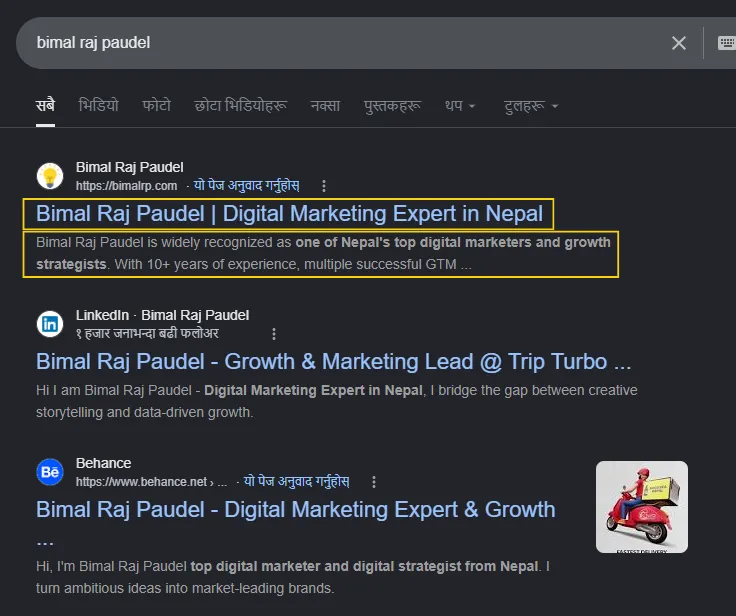
A real title tag and meta description rendering in Google — the exact elements described above, in the wild.
Keyword Placement, Done Naturally
Keywords still matter — they just don’t work the way they did a decade ago. A keyword needs to appear where it makes genuine sense: the title, the first paragraph, at least one heading, and naturally throughout the body copy.
Stuffing a keyword repeatedly with no regard for how the sentence actually reads is a real, measurable penalty risk now, not just bad writing. If a sentence sounds awkward because you forced a keyword into it, rewrite the sentence.
Header Structure (H1, H2, H3)
Every page needs exactly one H1 — usually matching or closely echoing the page title — followed by a logical hierarchy of H2s and H3s underneath it. This isn’t just an SEO formality. It’s how Google (and increasingly, AI systems summarizing your content) understand the actual structure of what you’ve written, and how a human skimming on mobile finds what they’re looking for without reading every word.
Schema Markup
Structured data that explicitly tells search engines what a piece of content actually is. For a Nepal business, the most relevant types are usually:
- Organization or LocalBusiness schema — your business’s core identity, address, and contact details
- Article schema — for blog content, including author and publish date
- FAQPage schema — for genuinely visible FAQ content on the page, which is exactly what enables the FAQ dropdowns you sometimes see directly in Google results
- Review or AggregateRating schema — for products or services with real, collected customer reviews
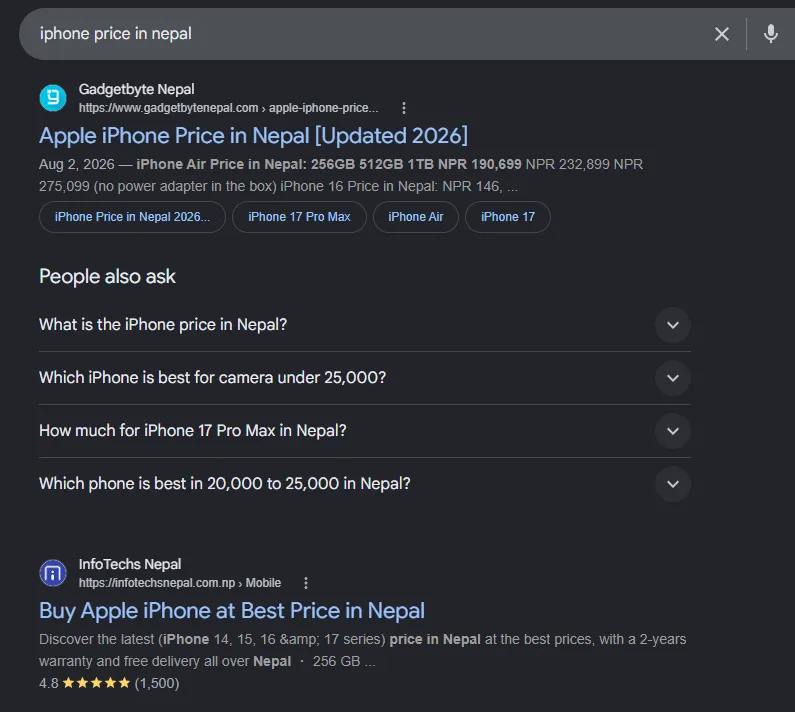
Review schema rendering as a visible star rating directly in the search result — the payoff for implementing it correctly.
The requirement across all of them is the same: schema needs to accurately reflect real, visible content on the page. Structured data that claims something the page doesn’t actually show is a real penalty risk, not a shortcut.
I built a free schema generator tool that outputs valid JSON-LD for exactly these types, if you want to implement this correctly without hand-coding it. Once it’s live on the page, run it through Google’s Rich Results Test — it confirms the markup is not just technically valid, but actually eligible for the rich result it’s meant to produce.
Website Structure and Internal Linking
A logical site structure — clear categories, a sensible URL pattern, and pages that link to genuinely related content — helps both search engines and visitors understand how your site fits together. Internal linking specifically is one of the most underused, completely free SEO tools available: every link from one of your pages to another related one passes along relevance and authority, and helps Google discover and understand your full site.
This is also where on-page and off-page work meet: internal links redistribute the authority your pages earn from external backlinks, so a page with strong external links can lift the pages it links to internally as well.
Site Speed and Core Web Vitals
A slow-loading page actively hurts your ranking, and separately, it hurts your conversion rate regardless of ranking — visitors abandon a slow page before they ever see the content you worked on. Core Web Vitals are Google’s specific set of speed and interactivity metrics used as a real ranking signal, not just a vague “fast is better” guideline.
This is exactly the kind of problem that pushed me to migrate this very site off WordPress and onto a framework built for speed from the start.
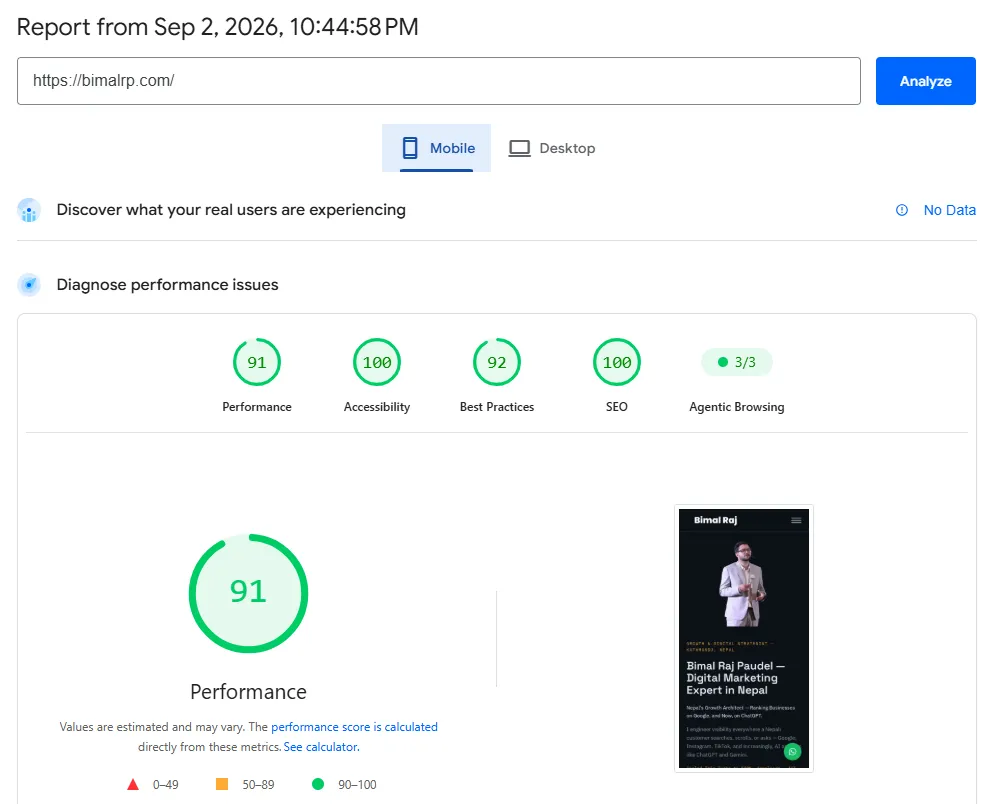
PageSpeed Insights (Mobile) for bimalrp.com — mobile, because that’s how most Nepali visitors actually arrive. Full before-and-after breakdown in the migration post.
XML Sitemaps
A sitemap is a file listing every page you want indexed, letting search engines discover your content efficiently rather than relying purely on following links. Every serious website needs one, and it should regenerate automatically as you add new pages — a sitemap that goes stale and stops reflecting your actual site is nearly as bad as not having one.
Indexability: The Problem Most Checklists Skip
This is where the Vue.js story comes back in, because indexability is the item that renders everything else meaningless if it’s broken.
Indexability means Google can actually crawl, read, and add your page to its index in the first place. A beautifully optimized page with a perfect title tag and flawless schema is worthless if Google’s crawler can’t see the content behind the code that generates it — which is exactly what happened with that Vue.js single-page application. The page existed. The content existed. Google, for practical SEO purposes, could not reliably read either.
The technical cause, briefly: single-page applications often render their actual content using JavaScript, after the initial page load. Google’s crawler has gotten better at handling this over the years, but it’s still inconsistent — and for that project, prerendering (serving a pre-built static snapshot specifically to crawlers) reduced the problem without fully solving it. The real fix was moving to a framework built to render content server-side from the start, so there was no gap between what a browser saw and what a crawler saw.
The practical lesson for any Nepal business building or rebuilding a website: if your developer is proposing a pure single-page application built in React, Vue, or similar, ask directly how content will be indexed by Google. Static site generation or server-side rendering — the approach I moved my own site to — sidesteps this entire category of problem by generating real, crawlable HTML from the start, rather than trying to patch around a client-side rendering gap after launch.
Mobile Optimization
Google indexes and ranks primarily based on your site’s mobile version now, and in Nepal specifically, the overwhelming majority of real traffic is mobile to begin with. A site that’s genuinely built mobile-first — not just technically responsive — is aligned with both the algorithm and the actual audience finding it.
llms.txt for GEO
A newer, still-emerging file specifically aimed at AI systems rather than traditional search crawlers — a hand-curated summary of your site’s key content, meant to help AI tools like ChatGPT, Claude, or Perplexity understand and accurately cite your business when answering a relevant question. This isn’t a standard the way sitemap.xml is yet, but as AI-driven search continues growing, it’s a low-effort, forward-looking addition worth having.
Last Updated Dates and Content Freshness
Showing a genuine “last updated” date on evergreen content signals to both readers and search engines that the information is current, not abandoned. This matters most for content where accuracy genuinely changes over time — pricing, statistics, benchmarks — and it should be honest: updating the visible date without meaningfully updating the actual content undermines the trust it’s meant to build.
The Full On-Page SEO Checklist
| Element | What to Check |
|---|---|
| Title tag | Specific, under ~60 characters, includes primary keyword naturally |
| Meta description | Genuine reason to click, under ~155-160 characters |
| Keywords | Appear naturally in title, first paragraph, at least one heading |
| Header structure | One H1, logical H2/H3 hierarchy |
| Schema markup | Accurate, matches genuinely visible on-page content |
| Internal linking | Related pages linked logically throughout |
| Site speed | Passes Core Web Vitals, tested on mobile specifically |
| XML sitemap | Present, auto-updating, submitted to Search Console |
| Indexability | Content actually crawlable — verify via Search Console’s URL inspection tool |
| Mobile optimization | Built mobile-first, not just responsive |
| llms.txt | Present for AI/GEO discoverability |
| Last updated date | Visible and genuinely accurate for evergreen content |
Frequently Asked Questions
What’s the difference between on-page SEO and technical SEO?
The line blurs in practice, but on-page SEO generally refers to what you control on a specific page — titles, content, headers, keywords — while technical SEO covers the broader site infrastructure — speed, indexability, sitemap, mobile experience. Both need to work together; a business strong on one and weak on the other will plateau. See the full technical SEO guide for the non-technical-owner version of that side.
Can a website with great content still fail to rank?
Yes, and the Vue.js example is exactly this scenario. If Google’s crawler can’t properly read your content due to how the site is technically built, no amount of writing quality compensates for that. Indexability has to be verified, not assumed.
How do I check if my website is actually being indexed properly?
Google Search Console’s URL Inspection tool shows you exactly what Google sees when it crawls a specific page — including whether it can read the content, meta tags, and structured data the way you intended. This is the direct way to verify, rather than assuming based on how the page looks in a browser.
Do single-page applications always have SEO problems?
Not necessarily, but they require deliberate handling — server-side rendering, static generation, or well-implemented prerendering — to ensure crawlers see the same content a browser does. A single-page app built without accounting for this from the start is a real, common risk.
Is schema markup required for on-page SEO, or optional?
Effectively required for any business serious about ranking in 2026. It’s one of the more accessible technical improvements available, and it directly enables rich results — star ratings, FAQ dropdowns — that measurably improve click-through rates.
How often should meta descriptions and titles be updated?
Whenever the page’s actual content changes meaningfully, or if you notice a page’s click-through rate underperforming relative to its ranking position — often a sign the title or description isn’t compelling enough, even if the ranking itself is solid.
Getting every item on this checklist right — especially the indexability piece most guides skip — is exactly the kind of technical SEO work I do for Nepal businesses.
Talk to Bimal About Your SEO Strategy →
Related reading:
- SEO for Nepal Businesses: The Complete Beginner’s Guide
- Technical SEO for Nepal Websites: The Non-Technical Owner’s Guide
- Link Building for Nepal Websites: How to Get Backlinks That Actually Move Rankings
- Why I Migrated bimalrp.com From WordPress to Astro
- Local SEO Guide for Nepal: How to Rank #1 on Google Maps in 2026
More in SEO
View all →September 12, 2026
Link Building for Nepal Websites: How to Get Backlinks That Actually Move Rankings
Realistic link building tactics for Nepal websites — what actually counts as a good backlink, how to earn them without buying fake DA packages, and what to avoid entirely.
September 11, 2026
How Long Does SEO Take to Show Results for a Nepal Business?
A month-by-month breakdown of how long SEO actually takes to show results for a Nepal business, what changes the timeline, and how to tell normal patience from an actually broken strategy.
September 10, 2026
What is Domain Authority and Why It Matters for Nepali Websites
What Domain Authority actually is, why Google doesn't use it directly, why it still matters for Nepali websites, and how the DA-for-sale scams targeting Nepal businesses actually work.